Updates
Stream alerts are back
Published
Alerts are rewritten as their own service, starting with Twitch, with simpler commands and new settings.
 Martine team
Hello there 📰 News! 
(Stream) Alerts are back, finally! This feature was completely broken for quite some time now, but it's been rewritten entirely from scratch to a dedicated service just for this purpose, which makes it a lot more reliable for this bot.
Okay that's cool you'll say but... what does it actually changes? 
Well great question, for now only Twitch is supported, yes for now is the keyword here, stay tuned for more sources (not essentially streaming related) being available soon™️ this year.
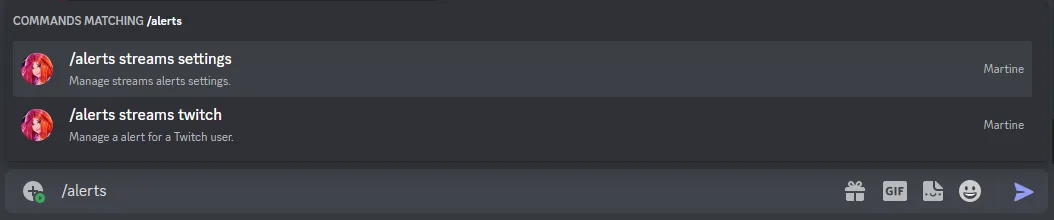
The usage has been a lot simplified as well compared of before. One main command, /alerts, with subcommands for each "category" of alert.
Want to set up a alert for a Twitch channel? Simply do /alerts streams twitch followed by the url or the name of the Twitch channel, that's it! 
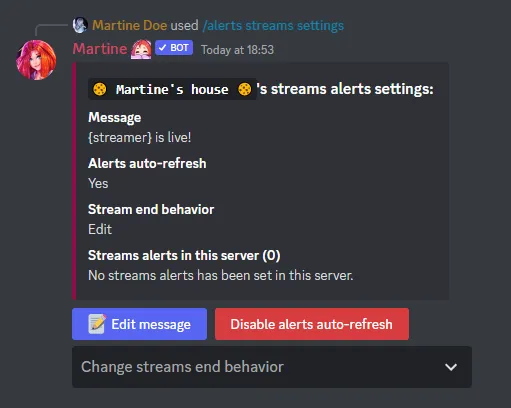
You can change the settings of streams alerts with one command, a button will be there for each setting to change. Talking of settings, a few new things compared of before, you can disable the fact that the streams alerts message are auto-refreshed every 15 minutes, and you can select what the bot should do when the stream end, either delete the alert, or edit or send a new message that contains some informations about the stream. 
Questions about this post? Ask in the support server (opens in a new tab).