Start here
Martine isn't answering
Published Updated
No answer to a command? Check that Martine is online, that she can talk in the channel, the prefix, and the commands switched off.
Most of the time it is one of these four things. Check them in this order.
Is she online?
Open the Status page. When part of Martine is down, it says so there, and she answers again once it is back. Under Where does your server live?, paste your server's ID and press Find shard to see whether the shard your server is on is running.
Check that Martine is still in your server's member list too. If someone removed her, add her again (opens in a new tab).
Can she talk in that channel?
In the channel where you run the command, Martine needs:
- View Channels
- Send Messages
- Embed Links, since most of her answers are embeds
- Send Messages in Threads, in a thread
A channel's own permissions can take these away even when her role has them, so check the channel's settings as well as her role. Adding Martine again with her invite gives her role every permission it asks for, and keeps her settings.
Are you using the right prefix?
The default prefix is ,, but a server can change it or add others. Two ways always reach her:
@Martine help: a mention works as a prefix./help: slash commands need no prefix.
Is the command switched off?
A command, or its whole category, can be switched off for the server, or in one channel.
- Step 1: Open Settings: Log in, pick your server, then open Settings in the bar.
- Step 2: What works in chat: This card lists every prefix your server answers to, then what is switched off, struck through.
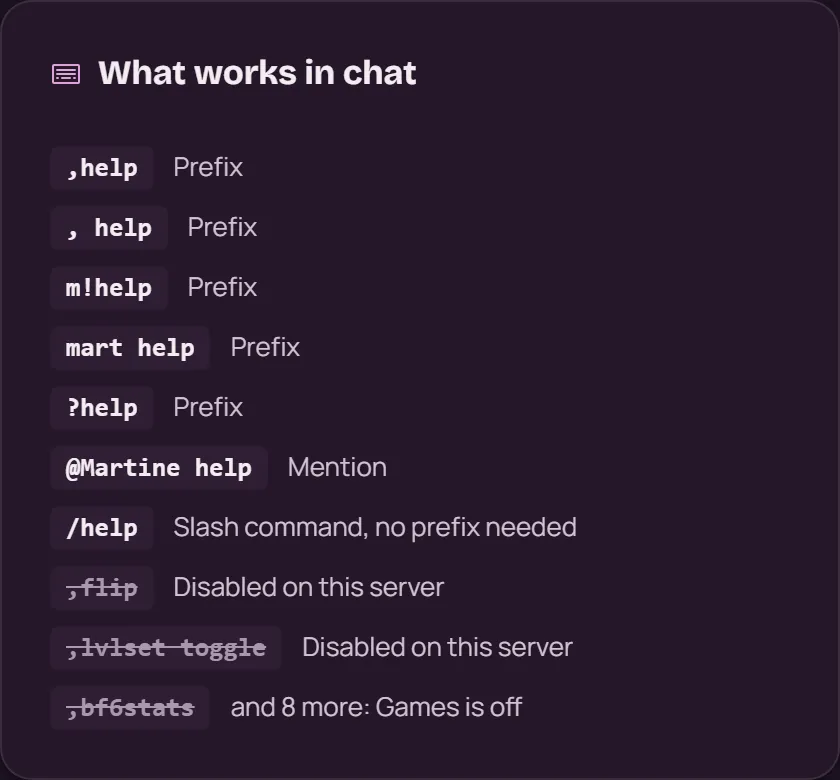
- Step 3: Switch it back on: In the Commands section, switch its category back on, or remove it from Disabled commands. Then press Save.
Turning commands on or off has the details.
With commands
,ping: if Martine answers with her latency, she can talk in this channel.,prefix: every prefix your server uses.,command listdisabled guild: what is switched off on the server.,command listdisabled channel: what is switched off in this channel only. The dashboard doesn't show these.
The last two need the server owner or an Administrator.
If it doesn't work
- NSFW commands only work in age-restricted channels: see Making a channel age-restricted.
- Some commands need a permission from you too, such as Administrator for
,command. - Slash commands don't show when you type
/? Your role needs Use Application Commands in that channel, and your server's Integrations settings can limit who sees Martine's commands. - Did you ever run
,selfblock? It puts you on Martine's blocklist, so she ignores your commands everywhere. Ask in the support server to undo it. - Still nothing? Ask in the support server (opens in a new tab): a human will answer.
More in this group
Questions about this tutorial? Ask in the support server (opens in a new tab).