Features
Giveaways
Published Updated
Start a giveaway from the dashboard or Discord: Martine posts it, counts the entries and draws the winners when time is up.
What it does
Martine posts your giveaway in the channel you pick. Members enter with the button on her message, and she checks your requirements as they do. When the clock hits zero, she draws the winners and replies to the message with them.
Set it up on the dashboard
- Step 1: Open Giveaways: Log in, pick your server, open Essentials in the bar, then Giveaways.
- Step 2: Start a new one: Press New giveaway. The form opens filled from your server's Defaults, and the preview shows the message as Martine will post it.
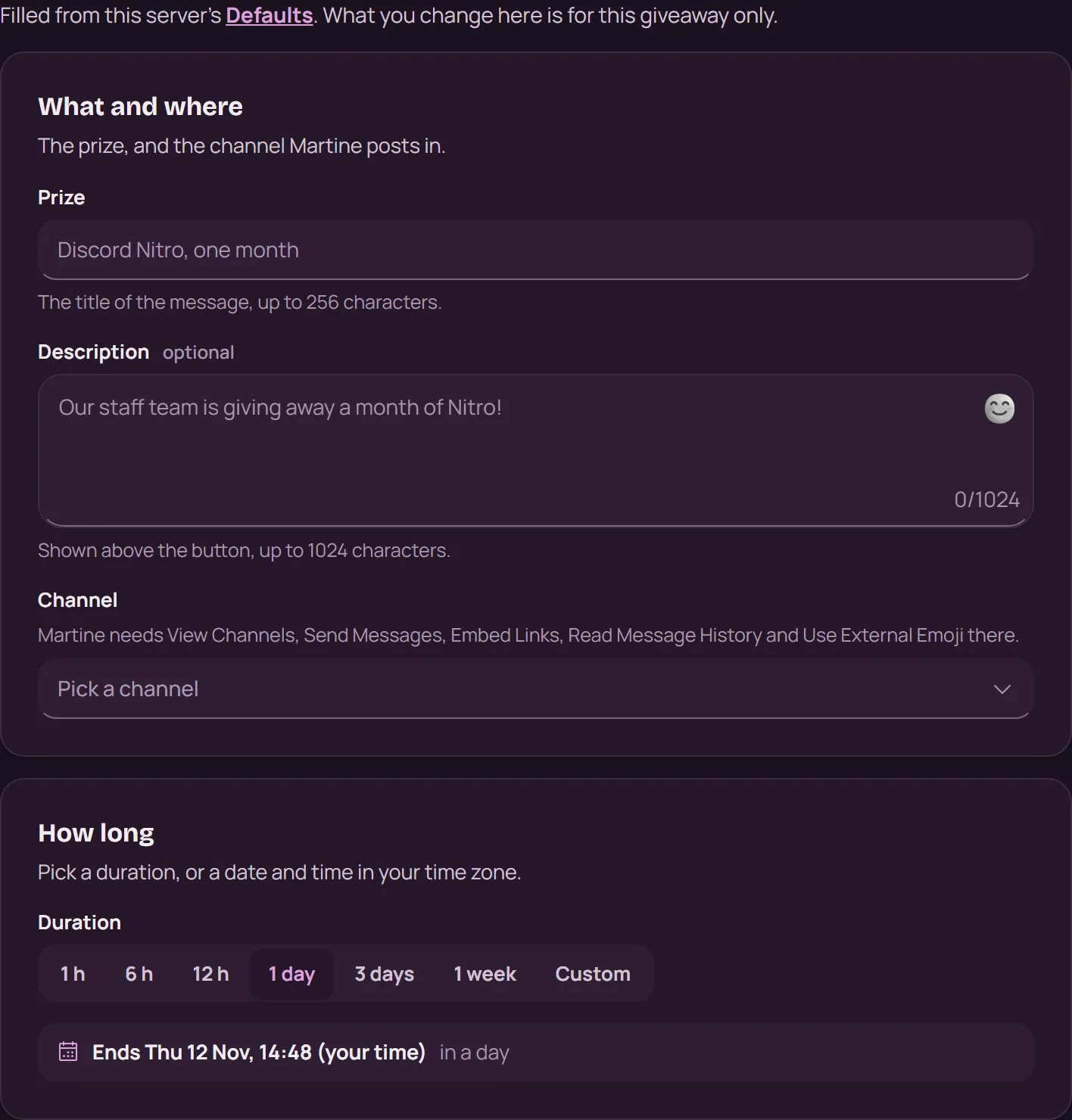
- Step 3: What and where: Write the Prize (the message's title, up to 256 characters), a Description if you like, and pick the Channel.
- Step 4: How long: Pick a Duration, from 1 h to 1 week, or Custom for a date and time in your time zone.
- Step 5: Winners and host: Set the number of Winners (1 to 25), the Host shown on the message, and the Button emoji.
- Step 6: Who can enter: Leave it empty and anyone in the server can enter. Or ask for Days in the server, up to 5 Required roles (All of them or Any of them), and add a Bypass role that skips the requirements.
- Step 7: Start it: Press Start giveaway. Martine posts it right away.
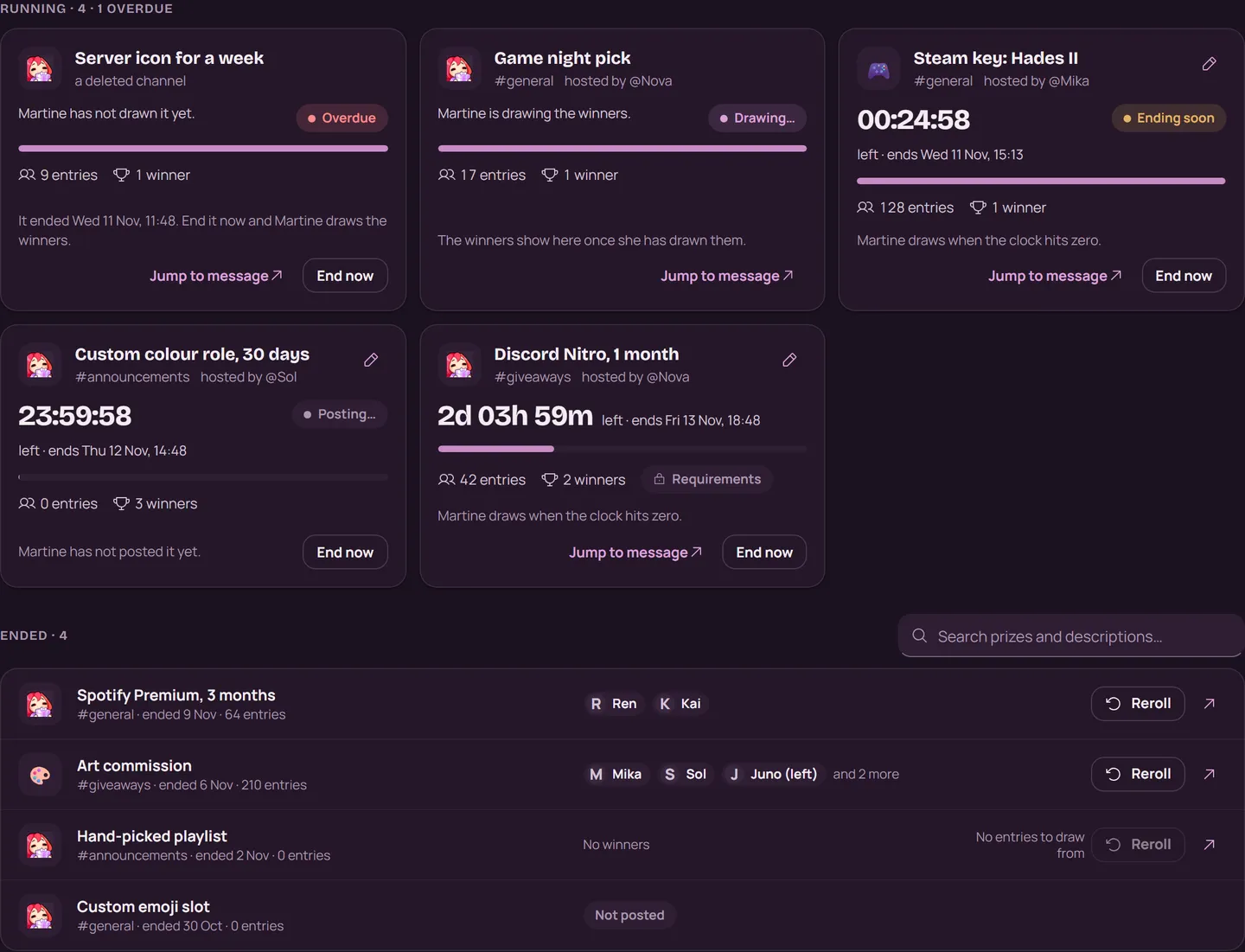
- Step 8: Follow it: The Giveaways page lists what's running and what has ended. Each running card counts down to its end, with End now and a pencil to edit it. An ended giveaway has Reroll, which draws new winners from the members who entered and haven't won.
Defaults, the tab beside Giveaways, holds what every new giveaway starts with: the channel, the host, the emoji, the winners and the entry requirements.
With commands
,giveaway create [use_config]: start a giveaway in Discord, step by step;,giveaway create yesstarts from your Defaults,giveaway list: the giveaways running on your server,giveaway end <message>: end one now, by its message link or ID,giveaway reroll <message> [count]: draw new winners,giveaway edit <message>: change one that's running,giveaway settings show: your server's defaults, which the other,giveaway settingscommands change
Creating, editing, ending and rerolling need the Manage Server permission.
If it doesn't work
- Martine has View Channels, Send Messages, Embed Links, Read Message History and Use External Emoji in the channel.
- A member who can't enter is missing a requirement: check Who can enter, or give them the Bypass role.
- A card marked Overdue hasn't been drawn yet: press End now and Martine draws the winners. If its message was deleted, she ends it without a draw.
- A running giveaway keeps its channel. To move it, end it and start a new one.
- Reroll stays off on a giveaway nobody entered: there is no one to draw.
- Still stuck? Ask in the support server (opens in a new tab).
More in this group
Questions about this tutorial? Ask in the support server (opens in a new tab).